Category: Promotion & Registrations

  • Webinar Invitation Emails That Actually Get Registrations

    Webinar Invitation Emails That Actually Get Registrations

    The average B2B inbox sees dozens of event invites a month, and most of them read like calendar notices — a topic, a date, a register button, then a quiet death in the promotions tab. Across a thousand-plus enterprise webinars, the invitation email is where I’ve watched nearly identical programs split hard: same topic, comparable speakers, and one team fills 400 seats while the other scrapes together 60.

    This playbook is scoped to acquisition — the emails that turn a subscriber into a registrant. Everything after the form is a different machine (that’s the four-email reminder sequence). Here you get the subject-line rule that wins nearly every test we run, the three-send invite arc, who the email should come from, plain text versus designed, and five copy-paste templates with notes on why each line exists.

    Outcome-led subject lines beat topic-led

    If you take one edit from this page, take this one: stop naming the topic and start naming the outcome. “AI marketing webinar” is a label. “Cut lead cost 30% before Q4 planning” is a reason to show up. The topic is what interests you; the outcome is what your registrant gets to tell their boss.

    • Topic-led: “Webinar: Marketing attribution in 2026” → Outcome-led: “Find the 20% of spend your attribution model is hiding”
    • Topic-led: “Join our ABM best practices session” → Outcome-led: “How 50-person marketing teams run ABM without an ops hire”
    • Topic-led: “Product update: new analytics features” → Outcome-led: “See the dashboard that cut our reporting day to 40 minutes”

    Three rules keep outcome-led lines honest. Only use a number the session can defend live — the fastest way to poison a list is a subject line the content doesn’t pay off. Keep it under roughly 55 characters so mobile doesn’t truncate the payoff. And you don’t need the word “webinar” in the subject at all — lead with the outcome and disclose the format in the first two lines of the body. On warm house lists, our invite opens land in the 20–35% band, and moving from topic-led to outcome-led lines is the change that moves that number more reliably than any send-time tweak.

    The three-send invite arc

    An invitation is a campaign, not an email. In our programs the promotion window runs three to four weeks — the channel-by-channel schedule lives in the webinar promotion timeline — and email carries three distinct sends inside it, each to the not-yet-registered segment, each with a different job.

    TimingJobAngle that works
    Send 13–4 weeks outPlant the flagOutcome + agenda; brand-sent, light design
    Send 2~2 weeks outBuild the caseSpeaker-sent, plain text, one sharp problem or data point
    Send 34–7 days outConvert fence-sittersHonest urgency, shortest path to the form

    Two mechanics matter more than the copy. Suppress registrants after every send — nothing erodes trust faster than being invited to something you already joined; registrants move into the reminder sequence instead. And never send the same email three times. Same offer, three angles. In our programs, sends two and three routinely add 50–100% on top of what the first send produces alone, which is exactly what a single-blast approach leaves on the table.

    Speaker-sent vs brand-sent

    Brand-sent emails buy you recognition, design control, and an easier conversation with legal. Speaker-sent emails buy you opens and replies. When we split these, the personal from-name wins opens on nearly every warm list — and it produces something the brand send never does: people answer a person. Those replies (“will there be a recording?”, “does this cover X?”) are free market research and pre-session content.

    My default pattern: send 1 from the brand, sends 2 and 3 from the speaker’s name, with one consistent reply-to across all three. The honest downside of speaker-sent at scale is that somebody has to actually answer the replies — an ignored reply does more damage than a marketing blast ever could. If you can’t staff the inbox, stay brand-sent.

    Plain text vs designed emails

    For B2B audiences, plain-text-style emails — light HTML, no banner, no columns, no hero image — consistently earn their keep. They read like a note from a colleague, they survive dark mode and Outlook untouched, and they match the speaker-sent frame. If the email looks like marketing, it gets processed like marketing.

    Designed emails still have one slot: the send-1 announcement, where an agenda block and a speaker headshot do real work, and audiences that expect polish. Even then — one CTA, the same registration link two or three times at most, and no banner graphic pushing your first sentence below the fold. The email’s job is the click; the registration page closes the deal.

    Five copy-paste templates

    Swap the brackets, keep the structure. The annotations tell you which lines are load-bearing.

    1. The announcement (send 1, brand-sent)

    Subject: Cut [metric] by [defensible number] — live working session, [date]

    Hi [first name] — On [date] at [time], [speaker], [title] at [company], walks through exactly how to [outcome], including [specific point 1], [specific point 2], and the mistake most teams make with [topic]. It’s 45 minutes live with Q&A, and everyone who registers gets the replay. [Save your seat →]

    Why it works: the outcome sits in the subject, the agenda specifics build credibility fast, and “everyone who registers gets the replay” removes the calendar objection without begging.

    2. The speaker’s note (send 2, plain text)

    Subject: the thing nobody says about [problem]

    Hi [first name] — I’ve spent [N] years on [problem], and most published advice skips the hard part: [uncomfortable truth]. On [date] I’m showing how we handle it, including the numbers we usually keep internal. 45 minutes, live Q&A at the end. Worth your time if [qualifier that describes your ideal registrant]. — [Speaker]

    Why it works: the lowercase subject reads like a colleague, “numbers we usually keep internal” is a concrete tease, and the qualifier filters for fit while flattering the reader.

    3. The problem-agitate (send 2 alternative)

    Subject: Your [process] is leaking [resource]

    Hi [first name] — Most [role]s we talk to assume their [process] is fine. Then they measure [specific thing] and find [common ugly result]. On [date], [speaker] shows the three places it leaks and the fix for each — live, with your questions taken as we go. [Register here →]

    Why it works: it names the cost of doing nothing, which converts a different buyer than the announcement’s upside framing — run both and let the list tell you which segment you have.

    4. The one-number tease (works at any stage)

    Subject: [Surprising number] — and what it means for [decision]

    Hi [first name] — One number from our [data source]: [stat]. It surprised us too, and it changes how you should think about [decision]. [Speaker] unpacks the full data set on [date] — what’s behind the number, where it doesn’t apply, and what to do about it this quarter. [Save a seat →]

    Why it works: a real number is the strongest curiosity hook in B2B — but only use data you own and can defend, and “where it doesn’t apply” signals honesty before anyone can object.

    5. The last call (send 3, speaker-sent)

    Subject: [Session name] is Thursday — the 30-second version

    Hi [first name] — Thursday at [time], I’m covering [outcome] in 45 minutes. If you’ve been meaning to register, this is the email to do it from — it takes 30 seconds: [link]. Can’t make it live? Register anyway and I’ll send you the replay. — [Speaker]

    Why it works: the urgency is real (it is this week), it acknowledges procrastination without shaming it, and the replay line captures the maybe-crowd you’d otherwise lose entirely.

    Benchmarks: what good looks like

    Work the math backwards from seats. Across our programs, registration-to-live attendance lands between 35–50% for warm audiences and 25–35% for colder ones. Want 200 people in the room live? You need roughly 400–570 registrants — more if the list runs cold. That number tells you whether email can carry the load alone or whether you need the LinkedIn motion running alongside it. In most B2B programs, email is the single biggest registration channel; it still shouldn’t be the only one.

    On the email side: warm-list opens in the 20–35% band, and click rates in the low single digits are normal — the invitation’s job is the click, not the registration. If clicks look healthy and registrations don’t, your problem is the landing page, not the email. Send invites Tuesday through Thursday, late morning in your audience’s dominant time zone — the same Tue–Thu, 11am–2pm ET window that performs strongest for the sessions themselves. Monday invites drown in the weekend backlog; Friday invites get archived on principle.

    Frequently asked questions

    How do you write a webinar invitation email?

    Lead with the outcome, not the topic: an outcome-led subject line, a two-to-three sentence body that names who the session is for and what they’ll be able to do afterward, and one call to action repeated at most twice. Then treat it as a campaign — three sends across a three-to-four-week window, each with a different angle, suppressing people who already registered.

    When should you send webinar invitation emails?

    First invite three to four weeks before the session, second around two weeks out, last call four to seven days out. Tuesday through Thursday sends in the late morning perform best in our programs; Monday and Friday sends consistently underperform.

    What is a good subject line for a webinar invitation?

    One that names the registrant’s outcome in under roughly 55 characters. “Cut lead cost 30% before Q4 planning” beats “AI marketing webinar” because it tells the reader what they get, not what you’re hosting. Use a number only if the session can defend it live, and skip the word “webinar” — the format belongs in the body.

    How many invitation emails should you send for a webinar?

    Three, to the not-yet-registered segment — announcement, case-builder, last call. Once someone registers they leave the invite track and enter the reminder sequence, which is its own four-email machine with a different job: getting registrants to actually show up.

    Should a webinar invitation be plain text or HTML?

    Mostly plain-text-style for B2B — it reads personal, renders everywhere, and pairs with a speaker from-name. A designed email earns its place once per campaign, in the brand-sent announcement where an agenda block and speaker photo do real work.

    Invitation copy is lesson-one material from our courses — see what’s coming, or get the free lessons by email as they ship.

  • Fill Webinar Seats on LinkedIn Without Paid Ads

    Fill Webinar Seats on LinkedIn Without Paid Ads

    Company-page webinar posts are where registrations go to die. A page with 4,000 followers posts the banner graphic, LinkedIn shows it to a few hundred of them, and a week later the team concludes organic doesn’t work. Across a thousand-plus enterprise webinars, I keep watching the opposite play out — the teams that reliably fill seats on LinkedIn spend nothing on ads. They spend three weeks running a specific sequence: an Event, direct network invites, speaker-led posts, and two well-timed carousels.

    This is that sequence, with the posting calendar and templates included. None of it requires Premium, Sales Navigator, or an ad account.

    Why organic beats ads for webinar promotion

    LinkedIn ads can fill a webinar, but the math is unkind. Cost per registration in competitive B2B categories has climbed steadily, and only 35–50% of registrants show up live — colder, ad-sourced audiences tend toward the bottom of that range or below it. You’re effectively paying two to three times the sticker price per person who actually attends.

    Organic registrants behave differently. They signed up because a person they already follow asked them to, so they arrive warmer and stay longer. The trade-off is honest: organic reach scales with your speakers’ networks. If your combined speaker network is 400 dormant connections, your first run will be modest. But it compounds — every webinar grows the network that promotes the next one, which is something an ad campaign never does.

    Ads rent reach. This playbook builds it.

    Set up the LinkedIn Event first

    Create the LinkedIn Event three to four weeks before the date — the same promotion window that works everywhere else. Host it from the company page, add every speaker by name, and turn on LinkedIn’s native registration form so people can sign up without leaving the platform. Less friction, more registrations captured.

    Two things most teams miss. First, export the registrant list at least weekly and feed it into your own reminder program — LinkedIn sends its own event notifications, but they are not a reminder sequence, and show-up rates live or die on reminders. Our four-email reminder sequence is the companion piece here. Second, the Event page becomes the single link every post, invite, and comment points to. One destination, everywhere — it keeps the algorithmically important early engagement pooled in one place instead of scattered across five landing pages.

    Pick Tuesday through Thursday, 11am–2pm ET. Two decades of attendance data keep landing on that window, and I’ve stopped arguing with it.

    Direct invites — the free distribution everyone ignores

    Once an Event exists, every host and every speaker can invite their first-degree connections directly. No Premium, no InMail credits, no cost. In our programs this is regularly the single largest registration source — often a third or more of total signups — and most teams never touch it because nobody assigned it to anyone.

    • Filter before you invite. The invite panel lets you narrow by industry, title keywords, and location. Invite the relevant slice of your network, not the whole list — irrelevant invites get ignored and train people to ignore the next one.
    • Batch it. LinkedIn caps weekly invites and the number moves around. Plan on a few hundred per profile per week, sent in batches of 50–100 a day, starting three weeks out.
    • Every speaker sends their own. An invite from the person presenting converts noticeably better than one from a company page admin. Put it in the speaker prep checklist.

    Direct invites reach the people your email list can’t. For the contacts you already have, a proper webinar invitation email still does the heavy lifting — LinkedIn is the surround sound, not the replacement.

    Speaker posts beat the company page — every time

    LinkedIn’s feed favors people over pages, and buyers follow practitioners, not logos. In our programs, the same announcement posted from a speaker’s personal profile routinely outdraws the company-page version several times over — gaps of 5–10x in impressions are common, not exceptional.

    A good speaker post is not “Excited to announce I’ll be speaking about…” — nobody registers for excitement. Teach one idea from the talk in the post itself, make the first line carry the hook, and mention the event at the end. The post has to be worth reading for someone who will never register; those are the readers who share it.

    Get each speaker to commit to three posts across the three weeks, and write that commitment into the speaker agreement before you announce anything. If you’re working with external or partner speakers, the co-hosted webinar playbook covers how to split that promotion load without awkwardness. The company page still has a job — it hosts the Event and reposts speaker content — but it’s the amplifier, not the lead instrument.

    Carousels in the two-week window

    Almost nobody calendars an event three-plus weeks out. Inside two weeks, they will. So your two strongest assets — carousel document posts — belong in the final two weeks, one per week, published from a speaker profile rather than the page.

    The format that travels: 8–12 slides, one genuinely useful takeaway pulled straight from the webinar content, big type, one idea per slide. The last slide points to the Event. The test I hold every carousel to: would this be worth saving even if the reader never registers? If the answer is no, it’s an ad in costume, and the feed treats it like one. Give the material away — the webinar is the live, deeper version with Q&A, and that framing sells itself.

    Community seeding without link-dropping

    LinkedIn groups are mostly ghost towns, so seeding today means two things: commenting substantively on active conversations in your topic area, and showing up in the niche Slack and Discord communities where your audience actually asks questions. The rule in both places is the same — answer the question fully, in-line, and mention the webinar only as an aside or when someone asks for more. A bare registration link dropped into someone else’s community gets you muted by the members and buried by the moderators, usually in that order.

    One more seeding move that costs nothing: ask five to ten colleagues to leave real comments on each speaker post within the first hour. Early engagement is what convinces the feed to widen distribution. Real comments means questions and additions — a row of “Great post” does nothing.

    The three-week posting calendar

    Here’s the whole sequence in one view. This covers LinkedIn only — it slots into the broader webinar promotion timeline alongside email and partner pushes.

    Speaker profilesCompany pageInvites & seeding
    Week 3 outAnnouncement post (template 1)Event goes live; repost speaker announcementFirst invite batches; start commenting in target conversations
    Week 2 outCarousel #1 + teach-one-idea post (template 2)Repost carousel; short “who this is for” postInvite batches continue; colleague comments on every speaker post
    Week 1 outCarousel #2 + final-call post (template 3)Repost; speaker intro snippetFinal invites; personal DMs to warm contacts only
    Final 48 hoursOne-line “we’re live Thursday” postLast repostNothing new — reply to every comment instead

    The three speaker post templates, ready to adapt:

    • Template 1 — announcement. “I keep getting asked [the question your webinar answers]. On [date] I’m walking through how we handle it, live — including [specific point] and [specific point]. Registration link at the end of this post.”
    • Template 2 — teach one idea. “[Contrarian or surprising claim from the talk]. Here’s why: [three to five sentences that actually explain it]. I’m covering the full version on [date] — link below if you want the rest.”
    • Template 3 — final call. “Thursday at 11am ET I’m showing [outcome]. If [pain point] is on your plate this quarter, this is the 45 minutes to steal back from your calendar. Last call to register.”

    Frequently asked questions

    How do I promote a webinar on LinkedIn without paying for ads?

    Create a LinkedIn Event three to four weeks out, have every speaker send direct invites to relevant first-degree connections, and run three speaker-led posts per presenter — including two carousel posts in the final two weeks. Direct invites plus speaker posts consistently outperform anything a company page can do on its own.

    Should I create a LinkedIn Event or just post the registration link?

    Create the Event. It enables direct network invites — the biggest free distribution channel on the platform — and gives every post one shared destination. A bare registration link gets none of that, and LinkedIn’s feed tends to throttle posts built around external links anyway.

    How far in advance should I start promoting a webinar on LinkedIn?

    Three to four weeks. Earlier than that and posts hit people too far from the date to commit; later and you can’t fit the invite batches and posting cadence in. Save your strongest content for the final two weeks, when people will actually put an event on their calendar.

    Do LinkedIn Events send reminders to registrants?

    LinkedIn sends some notifications to people who registered or accepted an invite, but they’re not dependable enough to carry your show-up rate. Export registrants into your own email reminder sequence — across our programs, live attendance lands between 35–50%, and the reminder program is the biggest lever on that number.

    How many times should I post about the same webinar?

    Three posts per speaker across three weeks, plus reposts from the company page. That feels like a lot from the inside; from the outside, organic reach means most followers see each post once or not at all. Repetition you can feel is roughly the minimum that registers with an audience.

    This is lesson-one material from our courses — see what’s coming, or get the free lessons by email as they ship.

  • What’s a Good Webinar Attendance Rate? 2026 Benchmarks

    What’s a Good Webinar Attendance Rate? 2026 Benchmarks

    Five hundred people register for your webinar. On the day, 204 log in. Someone on the team calls it a flop — where did the other 296 go? Here’s the thing: 204 out of 500 is a 40.8% attendance rate, and that is almost exactly the B2B median. After producing more than a thousand enterprise webinars over two decades, I can tell you that the panic over “only 40% showed up” is the single most common misreading of webinar math I see.

    The average webinar attendance rate in 2026 is roughly 41.6% of registrants for live B2B sessions. A healthy planning band is 40–45%. Colder audiences — paid ads, rented lists — land lower at 25–35%, while on-demand “just-in-time” formats can hit 60–80%. Below, I break down every one of those numbers by format, timing, and audience, and then get into the part vendors skip: what actually moves the rate.

    The short answer: 40–45% is good

    In the most recent cross-industry benchmark data (2026), the median registration-to-attendance rate for live B2B webinars sits at roughly 41.6%. Across my own programs — a thousand-plus enterprise webinars, mostly for tech companies — live show-up lands between 35% and 50%, and where you fall inside that range has far more to do with audience temperature than with production quality.

    So plan against 40–45%. If you’re consistently above 50% with a genuine outside audience, you’re doing something right — protect whatever it is. If you’re under 30% with a warm house list, something in your promotion or reminder mechanics is broken, and it’s usually fixable within one campaign cycle. Attendance rate is a hygiene metric, not a vanity metric. It tells you whether your operations are sound, not whether your webinar was good.

    2026 benchmarks by format and audience

    A single blended average hides more than it reveals. Platform vendors publish one number because it’s simple; in practice, the rate splits hard by who the audience is and how the session is delivered. These are the bands I plan against, cross-checked against the 2026 industry data.

    Format / audienceTypical attendance rateWhat I’d flag
    Live B2B, house list (customers, subscribers)40–50%The core planning band — this is where most healthy programs live
    Live B2B, cold audience (paid ads, content syndication)25–35%Normal. Never compare cold-traffic numbers against house-list numbers
    Cross-industry B2B median (2026)~41.6%The number to put in your planning doc
    On-demand “just-in-time” sessions60–80%Registration and viewing happen minutes apart, so almost nobody forgets
    Replay after the live dateReplay audience ≈ live audience, often largerCount it — a large share of your real reach arrives late

    Notice the pattern in that table. The single biggest driver of attendance is the gap between registering and attending. House lists trust you more than cold traffic, sure — but just-in-time sessions hit 60–80% mostly because there’s no multi-week window in which life happens and people forget. Every lever in this playbook is, one way or another, about managing that gap.

    Timing: 2 PM beats almost everything

    The 2026 data on time slots is unusually clear. Sessions starting at 2 PM attend at roughly 53%, and 11 AM slots come in around 50% — the two strongest windows by a visible margin. Tuesday through Thursday consistently outperform Monday and Friday. That matches what I’ve seen for years running ET-anchored B2B audiences: Tuesday to Thursday, 11 AM to 2 PM Eastern is the pocket, because it catches the East Coast after the morning scramble and the West Coast before lunch.

    Monday mornings lose to inbox triage. Friday afternoons lose to the weekend. Neither is a mystery, yet I still see teams book Friday 4 PM slots because that’s when the speaker was free — and then blame the topic when 22% show up. Length matters too: 45 minutes is the sweet spot. Long enough to earn the calendar block, short enough that people believe they’ll actually make it when they register.

    Why registrants don’t show (it’s not your topic)

    Here’s the stat that should change how you spend your energy: 67% of no-shows say they simply forgot. Not “lost interest,” not “chose a competitor’s content” — forgot. The registration was a genuine expression of intent, and then three weeks of meetings buried it.

    That reframes the fix. You don’t have a persuasion problem; you have a memory problem, and memory problems are solved with infrastructure. In our programs the standard is a four-email reminder sequence, and the day-of sends do the heavy lifting — the 15-minutes-before email routinely produces the biggest single spike of joins. Add a calendar file (.ics) on the confirmation page and in the confirmation email, because a webinar that lives in someone’s calendar competes for the time slot; one that lives in their inbox competes with 300 other emails.

    What actually moves the number

    After a thousand-plus events, these are the levers that reliably shift attendance rate — roughly in order of impact.

    • Reminder mechanics. The four-email sequence plus calendar files is worth more than any other single change. Teams that send one reminder are volunteering for the bottom of the range.
    • Promotion window. Three to four weeks is the balance point — long enough to build registration volume, short enough that early registrants don’t go completely cold. The full schedule is in our webinar promotion timeline.
    • Time slot. Moving a Friday afternoon session to Tuesday–Thursday, 11 AM–2 PM ET is often worth 5–10 points on its own.
    • Topic specificity. A precise promise (“cut SaaS renewal churn in Q1”) attracts people who clear their calendar; a vague one (“the future of customer success”) attracts drive-by registrations that never convert to seats. How you pick the topic shapes the attendance rate before promotion even starts.
    • Registration friction. Fewer form fields means more registrants but softer intent. I’ll take the bigger list — replay and follow-up recover much of the difference — but know that a two-field form will depress your live percentage while growing your absolute numbers.

    How to calculate yours honestly

    The formula is simple: unique live attendees ÷ unique registrants × 100. The dishonesty creeps in around the edges, and I’ve watched teams fool themselves with every one of these.

    • Count uniques, not logins. Someone who drops and rejoins three times is one attendee, not three. Most platforms get this right by default now; some still don’t.
    • Remove your own people. Hosts, panelists, and the six colleagues who joined to watch inflate small events noticeably.
    • Set a minimum-stay threshold. A two-minute drop-in isn’t an attendee in any meaningful sense. I use five minutes as the floor.
    • Segment by source. Blending a 45% house-list rate with a 28% paid-campaign rate produces a number that describes neither. Report them separately.

    And keep attendance in context: it’s the middle of the funnel, not the end. A 48% attendance rate that produces zero pipeline loses to a 38% rate that filled the sales calendar. Pair this metric with the rest of the funnel — our webinar conversion rate benchmarks cover the stages before and after this one.

    On-demand changes the math

    The fastest-growing formats barely resemble the classic scheduled webinar, and their numbers prove the forgetting thesis. Just-in-time sessions — where a visitor registers and the session starts within minutes — convert 60–80% of registrants into viewers, because there’s no gap for the registration to die in.

    Meanwhile, for scheduled events, the replay audience typically equals the live audience and often exceeds it. That means a team obsessing over moving live attendance from 42% to 46% while ignoring the recording is optimizing the smaller half of their reach. Build the replay funnel deliberately, and treat live attendance as one channel among several. Then make the whole thing pay off — attendance was never the finish line, and the follow-up playbook is where registrants, attendees, and replay viewers all get converted into actual outcomes.

    Frequently asked questions

    What is the average attendance rate for a webinar?

    For live B2B webinars, the 2026 median is roughly 41.6% of registrants. Warm house-list audiences typically land between 40% and 50%, colder paid-traffic audiences between 25% and 35%, and on-demand just-in-time formats reach 60–80%.

    Is a 50% webinar attendance rate good?

    Yes — 50% is well above the B2B median of about 41.6%. If you’re hitting 50% with an external audience rather than internal or customer-only registrants, your promotion timing and reminder sequence are working; document what you did and repeat it.

    How do you calculate webinar attendance rate?

    Divide unique live attendees by unique registrants and multiply by 100. Exclude hosts and internal staff, count each person once regardless of rejoins, and apply a minimum-stay threshold — five minutes is a reasonable floor — so drive-by joins don’t inflate the number.

    Why do people register for webinars but not attend?

    Mostly, they forget: 67% of no-shows report forgetting as the reason. The rest is calendar conflicts and fading urgency over a long promotion window. A four-email reminder sequence, a calendar invite at registration, and a 15-minutes-before email address the bulk of it.

    What is a typical webinar no-show rate?

    The mirror of attendance: expect 50–60% of registrants to miss the live session, rising to 65–75% for cold audiences. That’s why the replay matters — no-shows are still warm leads, and replay audiences often match or exceed the live turnout.

    Attendance benchmarks are lesson-one material from our courses — see what’s coming, or get the free lessons by email as they ship.

  • Webinar Registration Pages That Convert at 30%+

    Webinar Registration Pages That Convert at 30%+

    The average landing page converts around 11% of visitors. Webinar registration pages average roughly double that — about 23% — and the well-built B2B pages we see in our programs land between 20% and 40%. That spread is the whole story. Same traffic, same offer, and one page signs up three times as many people as another because of decisions that take an afternoon to change: the headline, the number of form fields, and whether the page gives visitors somewhere else to click.

    After a thousand-plus enterprise webinars, I can usually predict a page’s conversion rate before the first visitor hits it. This playbook is the checklist I run — what separates an 11% page from a 30%+ page, element by element, top to bottom.

    What a registration page should convert at

    Benchmarks first, because most teams grade themselves against the wrong number. Published averages put webinar registration pages around 23% — already well above the ~11% landing pages manage overall, because webinar visitors arrive with intent. Across our programs, honest B2B ranges look like this: warm email traffic to a clean page converts at 25–40%. Cold paid traffic to the same page converts at 10–20%. A blended rate in the low twenties is normal; 30%+ is achievable and worth chasing, mostly on warm traffic.

    The verdict version: if your warm-list traffic converts under 15%, you have a page problem, not a traffic problem. Fix the page before you spend another dollar on promotion. And remember the page is only step one — registrants still show up live at 35–50% in typical B2B programs, which is why the invitation email and reminder sequence matter as much as the page itself.

    Outcome-led headlines beat topic-led ones

    The single biggest gap between weak and strong pages is the headline. Weak pages lead with the topic: “Q3 Product Roadmap Webinar” or “An Introduction to Data Governance.” Strong pages lead with the outcome — what the attendee walks away able to do. “See the three roadmap features that cut onboarding time in half” will out-convert the topic version every time we test it, and not by a little.

    The working formula is outcome plus specificity: a concrete result, a number or timeframe if you can honestly claim one, and the audience named or implied. If you cannot write an outcome-led headline, that is usually a topic problem, not a copy problem — the session itself is built around what you want to say instead of what the audience wants to get. Fixing that starts before the page exists; our guide to picking a B2B webinar topic covers the upstream half.

    Three form fields — maybe four

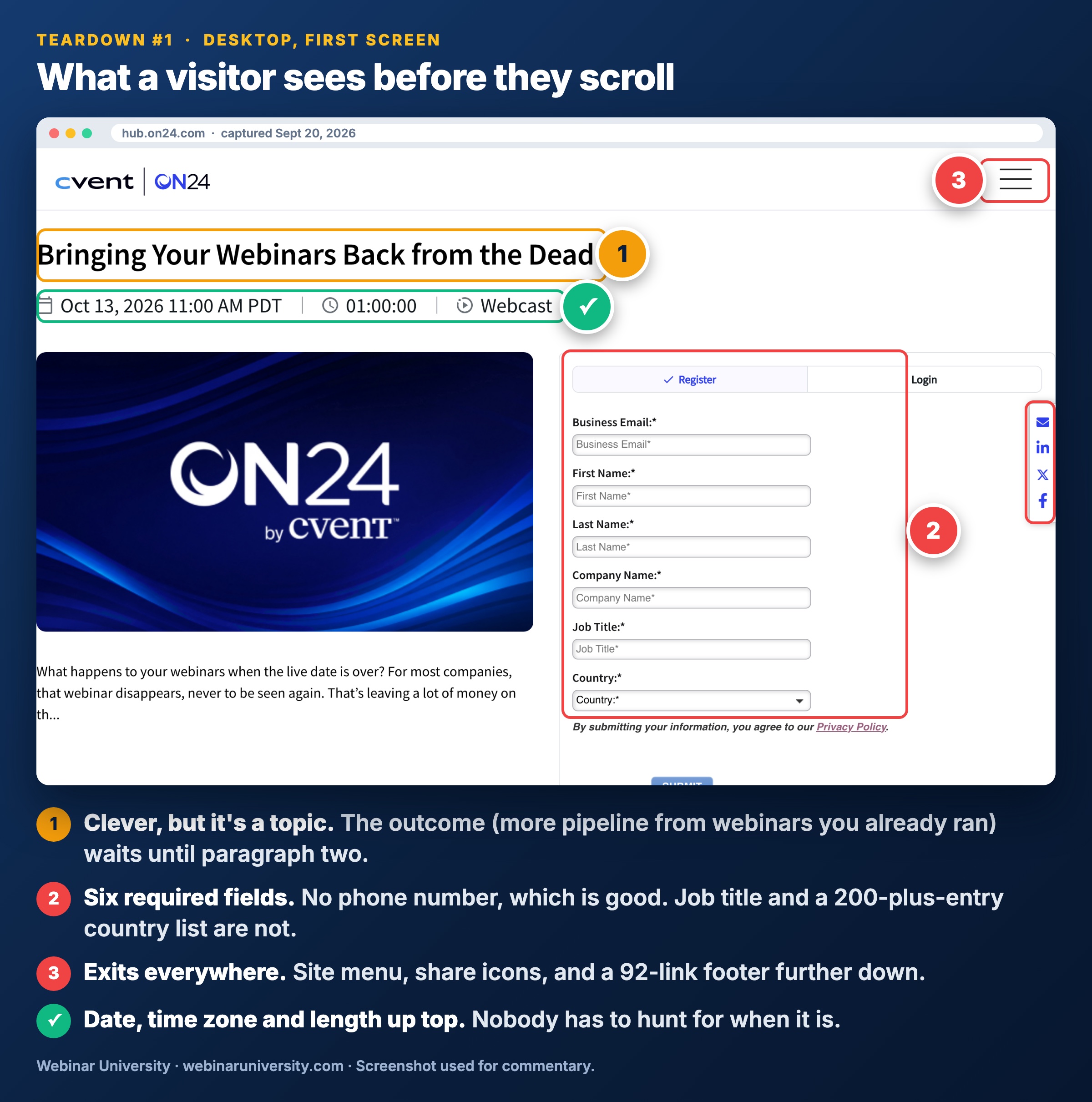
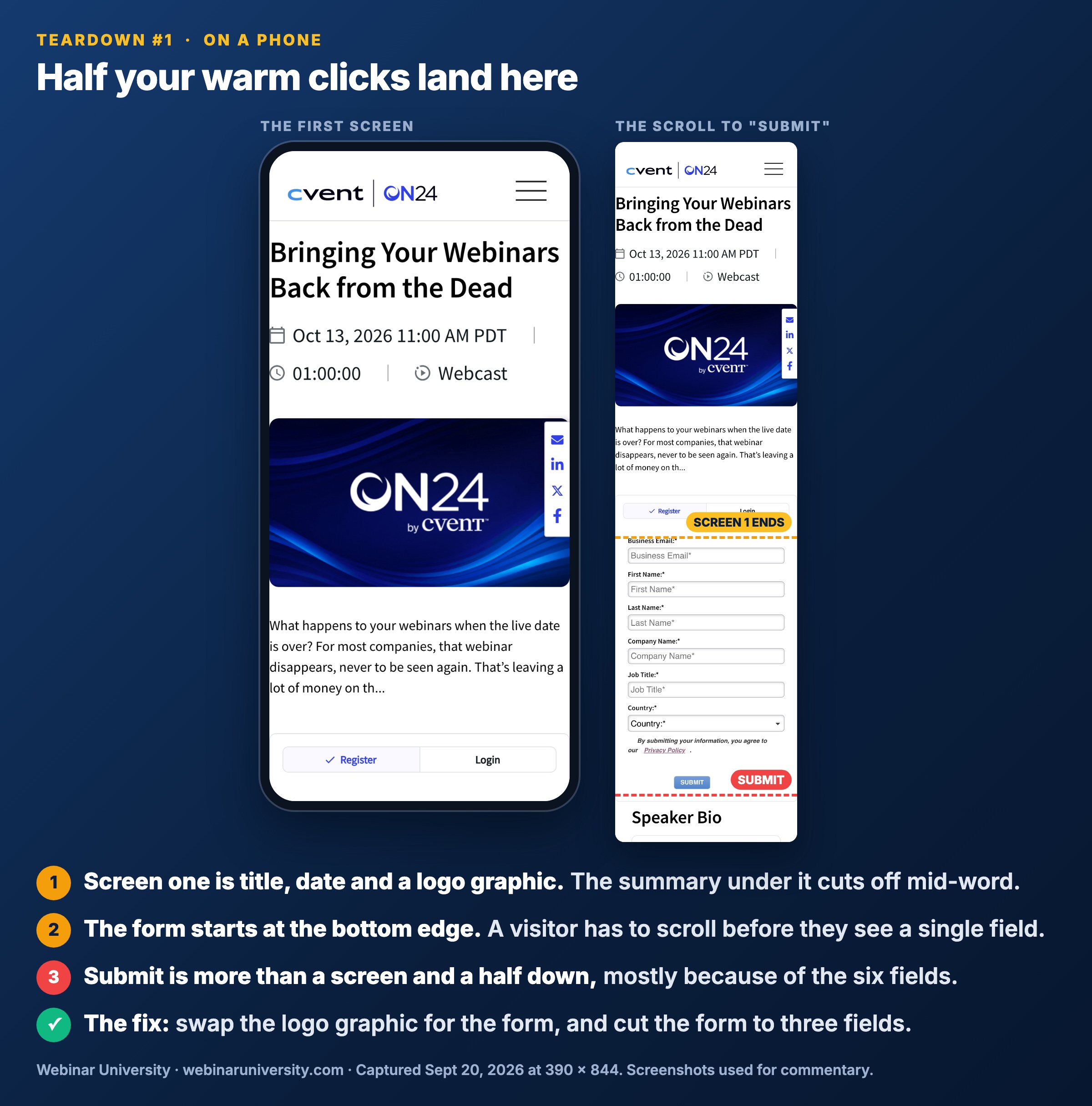
    Every field you add costs you registrants. In our experience the drop is not linear — going from three fields to six does not cost a little, it costs a lot, because somewhere around field four the form stops feeling like a signup and starts feeling like an application. The pages that convert at 30%+ ask for first name, email, and company. Sometimes one qualifying question. That is it.

    FieldKeep or cutWhy
    First nameKeepNeeded for reminder email personalization — plain “Hi,” underperforms.
    Work emailKeepThe one field that matters. Validate the format, nothing more.
    CompanyKeepCheap to type, and sales will ask for it anyway.
    One qualifying questionOptionalA single dropdown (role or team size) if sales genuinely routes on it.
    Phone numberCutThe biggest single conversion killer we see. Everyone knows why you want it.
    Job title free-textCutYou get “Manager” and typos. Enrich it later instead.
    “How did you hear about us”CutYour analytics already know. The visitor should not do your attribution.

    The pushback is always the same: sales wants the data. Fair — but a phone number field that cuts registrations by a third does not help sales. It hands them a shorter list. There is a better way to get the rest, covered below under progressive profiling.

    Remove the navigation and every other leak

    A registration page has one job, so it should have one clickable action. Weak pages inherit the site template: full navigation bar, footer with forty links, social icons, a “learn more about our platform” button. Every one of those is an exit. Visitors do not come back after they wander off to your pricing page.

    • Kill the nav bar. Logo stays, but unlinked or pointing nowhere. This alone is usually worth several points of conversion.
    • Kill the footer links. A privacy policy link is fine. The full sitemap is not.
    • Kill outbound CTAs. No demo buttons, no blog links, no social icons. One page, one form, one button.
    • Check mobile. Half your warm-email clicks arrive on a phone. If the form sits below three screens of scrolling, you are paying for that.

    The speaker block: credibility in 50 words

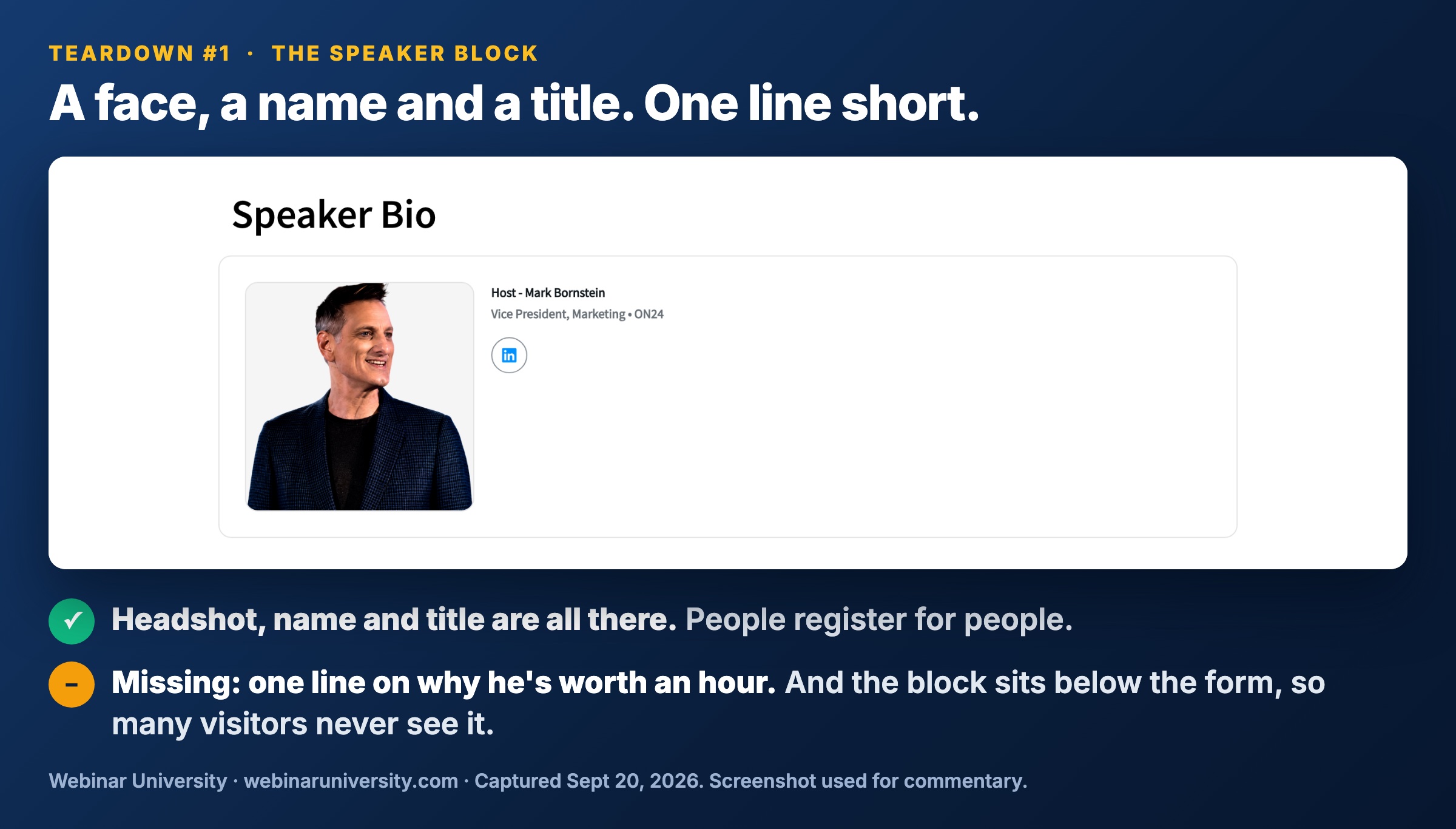
    People register for people, especially in B2B where the real question is “does this person actually know something I do not.” A speaker block earns its space when it is short: headshot, name, title, and one proof line — the single most credible thing you can truthfully say. “Has run demand gen at three companies through IPO” beats a 300-word bio nobody reads.

    What kills the block is padding. Award lists, alma maters, “passionate about helping customers succeed” — cut all of it. One line of proof per speaker, two speakers maximum on the page. If you have a genuinely recognizable guest, put them in the headline, not just the block. A borrowed audience is the fastest honest way to fill a promotion window.

    Progressive profiling beats the long form

    Here is how you keep sales happy with a three-field form: collect the rest after the conversion, when each question costs you nothing. The registrant has already said yes — every later touchpoint is a chance to learn one more thing.

    • Confirmation page. One optional question right after signup: “What’s the one thing you want answered in this session?” Response rates here are strong, and the answers write your talk for you.
    • Reminder emails. Our standard four-email reminder sequence has room for one profiling ask without hurting show-up.
    • In-webinar polls. Role, team size, current tooling — people answer polls live at rates no form ever sees.
    • Enrichment tools. Company and title can be appended from the email domain for pennies. Do not make humans type what software can look up.

    Anatomy of a 30%+ page

    Put it together and the winning page is almost boring. Top to bottom: a small eyebrow line with the date, time, and time zone. An outcome-led headline. Three short bullets on what attendees will be able to do afterward — bullets, not paragraphs. The form beside or immediately under that copy, three fields and a button that says something better than “Submit” (“Save my seat” tests well for us). A tight speaker block. Optionally one line of social proof — a real attendee count from a past session or one short quote. No nav, no footer maze, loads fast on a phone.

    Then remember the page is the start of the funnel, not the end. Registration is a promise, and 50–65% of the people who make it will still skip the live session — that is just the shape of average webinar attendance. The confirmation page and reminder sequence carry the rest of the load. A 30% page feeding a lazy follow-up still loses to a 20% page feeding a disciplined one.

    Frequently asked questions

    What is a good conversion rate for a webinar registration page?

    Published averages sit around 23%, against roughly 11% for landing pages overall. In our B2B programs, warm email traffic to a well-built page converts at 25–40%, while cold paid traffic runs 10–20%. Treat 30%+ on warm traffic as a realistic target, not a fantasy.

    How many fields should a webinar registration form have?

    Three: first name, work email, and company. Add a fourth only if sales genuinely routes leads on the answer. Every field past that point costs registrations, and the drop accelerates as the form starts to feel like an application.

    Should I ask for a phone number on a webinar registration form?

    No. It is the single most expensive field we see in testing — visitors know a phone field means a sales call. Collect it later through progressive profiling or enrichment if you truly need it.

    How do I increase webinar registrations without more traffic?

    Rewrite the headline around the attendee outcome, cut the form to three fields, and remove the navigation and footer links. Those three changes are where most of the 11%-to-30% gap lives, and none of them require a redesign.

    Do webinar registration pages need a video?

    No. A short speaker clip can help with cold audiences, but we have never seen video rescue a weak headline or a long form. Get the fundamentals right first; treat video as a test, not a requirement.

    This is lesson-one material from our courses — see what’s coming, or get the free lessons by email as they ship.

  • When to Start Promoting a Webinar (A 4-Week Timeline)

    When to Start Promoting a Webinar (A 4-Week Timeline)

    The most common webinar promotion mistake I see is not starting too late — it is starting too early and running out of gas. A team opens registration six weeks out, emails the entire list on day one, posts twice on LinkedIn, and then goes quiet for the final ten days. Which is exactly when most of their registrations were going to arrive.

    After a thousand-plus enterprise B2B webinars, my answer to how far in advance to promote a webinar has not changed in a decade: three to four weeks. But the start date is the least interesting part of the answer. What matters is how you distribute effort across those weeks — because the registration curve is heavily back-loaded, and most teams spend as if it were front-loaded. Here is the exact week-by-week timeline I run, with the share of registrations to expect from each week.

    The short answer: 3–4 weeks

    Open registration and send your first invitation three to four weeks before the live date. In our programs, a full four-week promotion window reliably beats a two-week window on final registration count — the lift usually lands in the 10–15% range, which matches the roughly 12% lift industry benchmark reports have attributed to four-week campaigns. Shorter than two weeks and you are leaving registrations on the table. Longer than five weeks and early registrants forget they signed up, which quietly erodes your live show-up rate — the 35–50% attendance we typically see from warm audiences drops noticeably when the gap between registration and event stretches past a month.

    One prerequisite before any promotion starts: the registration page has to be done. Not a draft — done. Every day your emails point at a half-built page is a day of wasted clicks. If yours needs work, fix that first — our guide to webinar registration page conversion covers what actually moves the number.

    The registration curve is back-loaded

    Here is the number that should reshape your whole plan: industry benchmark studies have consistently found that around 49% of webinar registrations arrive in the final seven days before the event. Our program data agrees — across our webinars, the final week typically delivers 40–55% of total registrations, and the single biggest registration day is usually the day of the event itself or the day before.

    B2B audiences do not plan their calendars a month out. They commit when the event feels close enough to be real. That is not a failure of your early promotion — the early weeks build the awareness that converts later. But it means the conversion window is the last seven days, and that is where your sharpest email copy, your retargeting budget, and your speakers’ loudest posts belong. Most teams do the opposite. They spend their creative energy and budget in week one, then coast.

    The 4-week promotion calendar

    This is the webinar promotion schedule I hand to every team I work with. The registration-share column is the honest range from our own programs — use it to sanity-check your pacing mid-campaign.

    WeekJob to doPrimary movesShare of registrations
    Week 4 (T-minus 4)Open strong with your warmest audienceRegistration page live, first invitation to warm segments, speakers post a save-the-date~10–15%
    Week 3Broaden reachFull-list invitation, organic LinkedIn from the company page and speakers, partner mentions~15–20%
    Week 2Build urgencySecond invitation with a new angle, paid retargeting starts, speaker content posts~20–25%
    Final weekConvertTwo to three emails including a last-chance send, retargeting at peak spend, day-before and morning-of pushes~40–55%

    Notice the shape. Effort and budget should climb every week, peaking in the last seven days. If your calendar looks like a burst of activity followed by silence, you have built it upside down.

    Channel-by-channel timing

    • Email. Your workhorse — in our programs email drives 60–75% of registrations. Send the first invitation at T-minus 3–4 weeks to warm segments, a full-list send in week 3, a re-angled invitation in week 2, and two to three sends in the final week. Vary the hook each time; do not resend the same email. The invitation email itself deserves real copywriting attention, and once people register, a four-email reminder sequence protects your show-up rate.
    • LinkedIn organic. Start in week 3 — earlier posts evaporate. Company-page posts are table stakes; posts from the speakers’ personal profiles routinely pull 3–5x the engagement in our experience. Full tactics in our playbook on promoting a webinar on LinkedIn.
    • Speaker posts. Two per speaker minimum: one when registration opens, one in the final week. The final-week post is the one that converts — it should include a concrete reason to attend live, not just a link.
    • Paid retargeting. Do not start paid until week 2. Retargeting page visitors who did not register is the highest-converting paid audience you have, and it barely exists until organic and email have driven traffic. Weight roughly 70% of paid budget into the final ten days.

    Where teams go quiet — and lose registrations

    The failure pattern is always the same. The launch week feels productive — new page, big send, kickoff posts. Then week 2 arrives, nothing is on the calendar, and everyone drifts back to other work. By the final week the campaign is running on fumes precisely when half the registrations are up for grabs.

    Two fixes. First, write every email and post before the campaign starts — final-week assets included. Urgency copy written during the busy final week is reliably the worst copy in the campaign. Second, put the full webinar marketing timeline on a shared calendar with owners attached to each send and post. In my experience the teams that schedule the last-chance email on day one are the teams that actually send it.

    Only have two weeks? The compressed version

    Sometimes the date is handed to you fourteen days out. You will give up some volume — but since the final week carries the most weight anyway, a two-week sprint still works. Compress, do not skip: first invitation to the full list on day one, LinkedIn and speaker posts starting day two, retargeting live by day four, and the same two-to-three-email final-week cadence. Expect a smaller top-of-funnel, and expect the final week to deliver 60%+ of your registrations instead of half. What you should not do is push promotion below one week — that is when volume genuinely collapses, because there is no awareness base for the conversion window to convert.

    Frequently asked questions

    How far in advance should you promote a webinar?

    Three to four weeks before the live date. Four-week campaigns out-register two-week campaigns by roughly 10–15% in our programs, while promotion windows past five weeks hurt show-up rates because early registrants lose the thread.

    How many emails should you send to promote a webinar?

    Five to seven promotional sends across the window works well: one at open, one full-list send in week 3, one re-angled invitation in week 2, and two to three in the final week. After registration, switch people to a separate four-email reminder sequence — reminders protect attendance, invitations drive registration, and mixing the two muddies both.

    What is the best day and time to host a B2B webinar?

    Tuesday through Thursday, 11am–2pm ET, is the strongest window across our programs — it catches both US coasts and, at the early end, Western Europe. Mondays collide with planning rituals and Fridays with checked-out calendars.

    Is one week enough time to promote a webinar?

    It is the floor, not a plan. You can scrape together an audience in seven days from a warm list, but you lose the awareness-building weeks that make final-week conversion work. If you are forced into it, run the final-week cadence — two to three emails, daily speaker posts, retargeting from day one — and set expectations at half the registrations a three-week campaign would produce.

    When do most people register for a webinar?

    In the last week — benchmark studies put roughly 49% of registrations inside the final seven days, and our programs consistently land in the 40–55% range. The day before and day of the event are usually the two biggest individual registration days.

    Timelines like this are lesson-one material from our courses — see what’s coming, or get the free lessons by email as they ship.

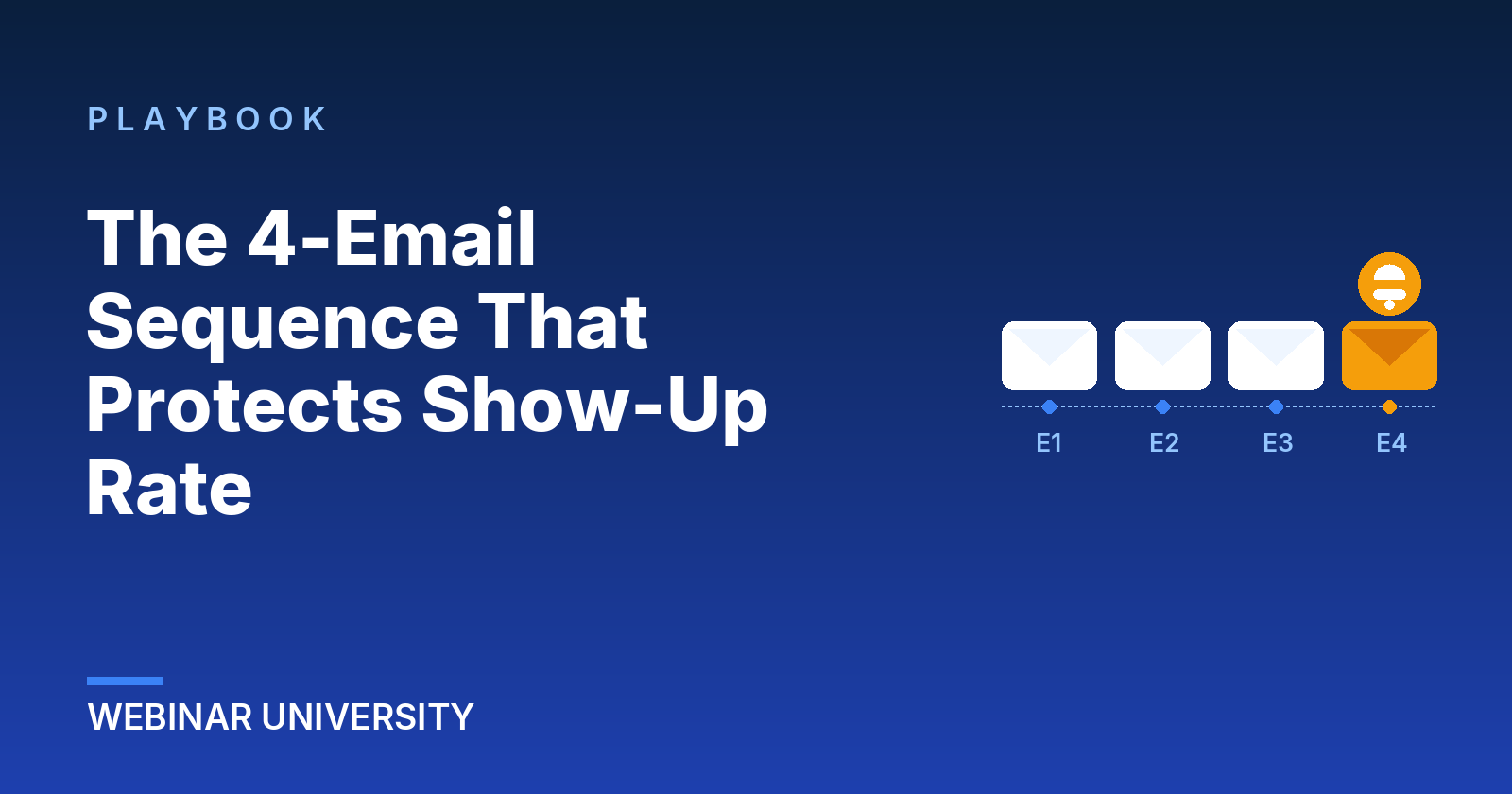
  • The Four-Email Reminder Sequence That Protects Your Show-Up Rate

    The Four-Email Reminder Sequence That Protects Your Show-Up Rate

    A webinar registration is a promise made in a weak moment. Someone saw your topic on a Tuesday, thought “that’s my problem,” and gave you an email address. The live date is nine days away. Between now and then: forty other emails a day, three reprioritized projects, and a calendar that eats optional commitments for breakfast.

    B2B show-up rates settle around 35–45% when promotion is done well, and drop into the low twenties when it isn’t. The difference is rarely the platform or even the topic — it’s what happens in the inbox between registration and showtime. This is the four-email sequence we’ve run, in various forms, across a thousand-plus enterprise webinars.

    Why registrants no-show (it isn’t disinterest)

    People who registered wanted to come. Treat no-shows as a memory problem and a priority problem, never a rudeness problem. Your sequence has two jobs: keep the session attached to the problem that made them register, and make attending the path of least resistance when the hour arrives. Every email below does one of those jobs or both.

    Email 1 — the confirmation that re-sells the seat (immediately)

    The confirmation email gets the highest open rate of anything you will ever send — often north of 70% — and most teams waste it on “You’re registered!” plus a calendar link. Keep both of those, then add the one thing that matters: a restatement of the payoff. One sentence. “On Thursday you’ll see the exact dashboard [Company] uses to cut alert noise 60%.”

    The calendar attachment is non-negotiable, and check that it carries the join link inside the event body. A meaningful share of your attendance will come from people who never open another email and just click the calendar entry at showtime.

    Email 2 — the value drop (three days out)

    Three days before the session, teach something. Not a teaser — an actual, usable fragment of the content: one chart, one stat, one mistake to check for. The message it sends is “the live session is more of this,” which is the most credible promotion a webinar can get.

    This is also the right place for social proof if you have it honestly: registrant count (“312 of your peers are in”), a notable company name with permission, or a sharp question already submitted. Skip it if you’d have to inflate — B2B audiences smell rounded-up numbers.

    Email 3 — the day-before case (24 hours out)

    The day-before email makes the case for attending live instead of “catching the replay” — the polite lie every registrant tells themselves. Give live attendance something the replay genuinely won’t have: open Q&A with the speaker, a worksheet handed out in-session, a candid segment that stays off the recording. Say what it is plainly.

    Structure: three-line agenda with timestamps, the live-only reason, join link high in the message. If your platform supports it, this is also where “add to calendar” gets offered one more time — some registrants delete the first invite.

    Email 4 — the one-hour runway

    Sixty minutes before showtime: one sentence, one link. “We’re live in an hour — here’s your seat.” Nothing else. No agenda recap, no speaker bios, no images that slow mobile rendering. This email gets skimmed on a phone between meetings, and its only job is to be un-missable and instantly clickable.

    Some teams add a five-minute “we’re starting” send. It works — attendance bumps another few points — but earn it with restraint elsewhere. A sequence that respected the inbox all week gets forgiven one last nudge.

    Timing and subject lines at a glance

    EmailWhenSubject patternJob
    1 — ConfirmationInstantly“You’re in: [outcome] on [day]”Calendar + re-sell the payoff
    2 — Value drop3 days out“Before Thursday: one number worth seeing”Prove the session’s worth
    3 — Day before24 hours out“Tomorrow: [topic] (live Q&A included)”Sell attending live
    4 — Runway60 minutes out“We’re live in an hour”Be the click

    What does good look like when the sequence is running? Watch three numbers across your next four webinars: show-up rate (the whole point — expect the high thirties to mid forties for a warm B2B list), calendar-accept rate on email 1 (above 40% means the payoff line is landing), and click-to-join rate on email 4 (this one should embarrass the others). Track them per webinar in the same sheet as your registration numbers so the trend is visible; a sequence tweak that moves show-up three points is worth more than a hundred extra cold registrants.

    Reminders protect registrations you already won. The invitation emails win them in the first place, and our attendance-rate benchmarks tell you whether your show-up number is actually a problem or just normal.

    Frequently asked questions

    Is four emails too many? Our list is sensitive.

    Four emails across nine days to someone who explicitly asked for the event is not pressure — it’s service. Watch the unsubscribe rate on the sequence specifically: under 0.3% per send, you’re fine. What burns lists isn’t reminder count, it’s reminders with nothing in them.

    Should we resend to people who didn’t open?

    Resend email 3 to non-opens with a changed subject line, eight to twelve hours later. Skip resending the others. And treat open rates as directional only — privacy proxies have made them soft numbers for years.

    Does SMS help for B2B webinars?

    When you can get the number honestly, a single showtime text outperforms every email in the sequence for same-hour attendance. But collect it optionally at registration with a stated purpose. A surprise text to a work phone spends trust you’ll want later.

    What changes for evergreen/automated webinars?

    Compress the same arc into the shorter window: confirmation, one value email, one runway send. The day-before case matters less because the registrant picked a near-term slot themselves — proximity does the urgency work for you.

    Who should the reminder emails come from?

    The speaker, not the brand, wherever your platform allows it. “From: Dana Chen” with a first-person line outperforms “From: Acme Webinars” on every send in the sequence, because calendars get cleared for people, not logos. Keep the reply address monitored — a registrant replying with a question is the warmest signal the whole sequence produces.

    The full promotion system — landing pages, sequences, and the show-up math — is the heart of our first course. See the course lineup or get free lessons by email. Related: how to pick a topic people register for.